Tunnels on plain OpenSSH
Every channel is an ssh -w connection with its own point-to-point tunN interface on both sides. No installed service on the VPS, only the standard packages the tunnels need when they are missing.
Version 0.2.2 · GNU GPL v3 · Debian and Ubuntu
Tunnel Control™ keeps a set of plain OpenSSH tunnels (ssh -w) up between a Linux server on the local network and one or more VPS hosts, balances the traffic of the local network across them and fails over to the live channels when a channel or a whole VPS drops out. It watches every channel and shows the whole picture in a web panel. It is self-hosted: the manager and the panel run on your server. Nothing of its own is installed on the VPS: the tunnels are plain OpenSSH, and only the standard packages they need are added when missing.
$ curl -fsSL https://tunnelcontrol.app/install.sh | bash
Debian or Ubuntu with systemd, as root. Installs the latest release into /opt/tunnelcontrol; then fill in tun.config and run tun --install.


Tunnel Control™ reconfigures the server and every VPS completely, so it goes on clean systems that run nothing else.
iptables on every start, takes over several routing tables and rule priorities, turns on IP forwarding and turns off IPv6.sshd_config, adds its key for root, installs the packages the tunnels need when they are missing, turns on IP forwarding and resets iptables, closing incoming connections except ping and SSH.Features
Every channel is an ssh -w connection with its own point-to-point tunN interface on both sides. No installed service on the VPS, only the standard packages the tunnels need when they are missing.
On the first connection the key is installed, sshd_config gets PermitTunnel and keepalive, and the firewall, NAT and routing rules are built. Before each setup the VPS is checked: missing packages and kernel modules are installed, and a VPS that cannot run tunnels is held off with the reason. All it needs is the root password, once.
Each channel is checked by its own ping-pong inside the tunnel and by traffic counters. A channel that stops answering is reconnected and returns to the route once it answers again; a VPS that went down is set up again when it comes back.
Live channels form one multipath (ECMP) default route with a weight per channel, so a faster VPS can take a larger share. A channel that drops out is taken out of the route, and its traffic fails over to the live ones.
With more than one VPS the scheduler reconnects channels on a schedule: it waits until the channel's traffic drains, and keeps a minimum interval and a minimum uptime per channel.
tc tbf in both directions, ingress through an ifb interface. One setting in tun.config, applied on the next start.
Channel status, traffic charts, the log, a config editor, start and stop, push notifications. HTTPS with a certificate you can install on your devices, renewed by the panel itself, and a PWA for the phone's home screen. Or console only: tun --status and tun --monitor.
tun --update replaces only the code. tun.config, the per-VPS setup files, data/ and bak/ are never touched. Once a day the server checks for a newer release and tells you in the panel, in tun --status and with one push.
LOG_LEVEL 0–3: by default only key events, warnings and errors. Logrotate is set up by the installer; the VPS log can live in /tmp.
How it works
Traffic that arrives on the local interface is routed into the tunnels. The subnet itself keeps using the normal routing table, so the server stays reachable from the local network. One line in TUNNELS is one channel. Three channels per VPS are recommended for the smoothest rotation: it reconnects one channel at a time, and while that channel is down, the other channels of the same VPS carry its share of the traffic.
The config is yours: created from the example, never overwritten by updates, checked value by value before every start and as you type in the panel's editor. Everything else has a default in tun.defaults; put the line you want to change into tun.config.
CONFIG="eth0:192.168.0.0/16"

# HOST:PORT:PORT_RANGE:IN_IFACE:PUBLIC_IP:OUT_IFACE:WEIGHT

TUNNELS=(
    "203.0.113.10:22222:22223-65535:eth0:NA:NA:40"
    "203.0.113.10:22222:22223-65535:eth0:NA:NA:40"
    "203.0.113.10:22222:22223-65535:eth0:NA:NA:40"
    # "198.51.100.7:22222:22223-65535:eth0:198.51.100.8:eth0:40"
)

DATA_PATH="./data"
Tunnel Control™ Panel
Dashboard with a switch per host, Global Stats and traffic charts, the tun.config editor, logs with auto-scroll, start, stop and push notifications, in a light and a dark theme. The panel is self-hosted on the server: HTTPS on port 8443 with a certificate you can install on your devices, which the panel renews by itself before it ends, and a PWA for the phone's home screen.


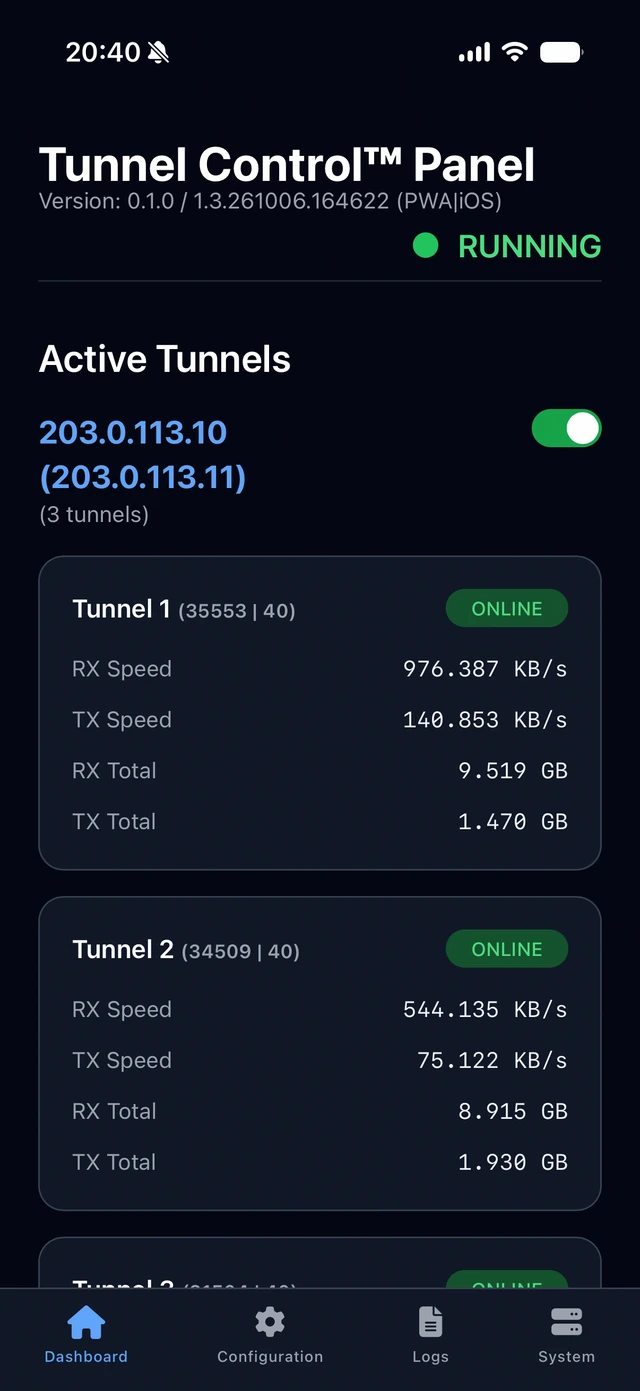
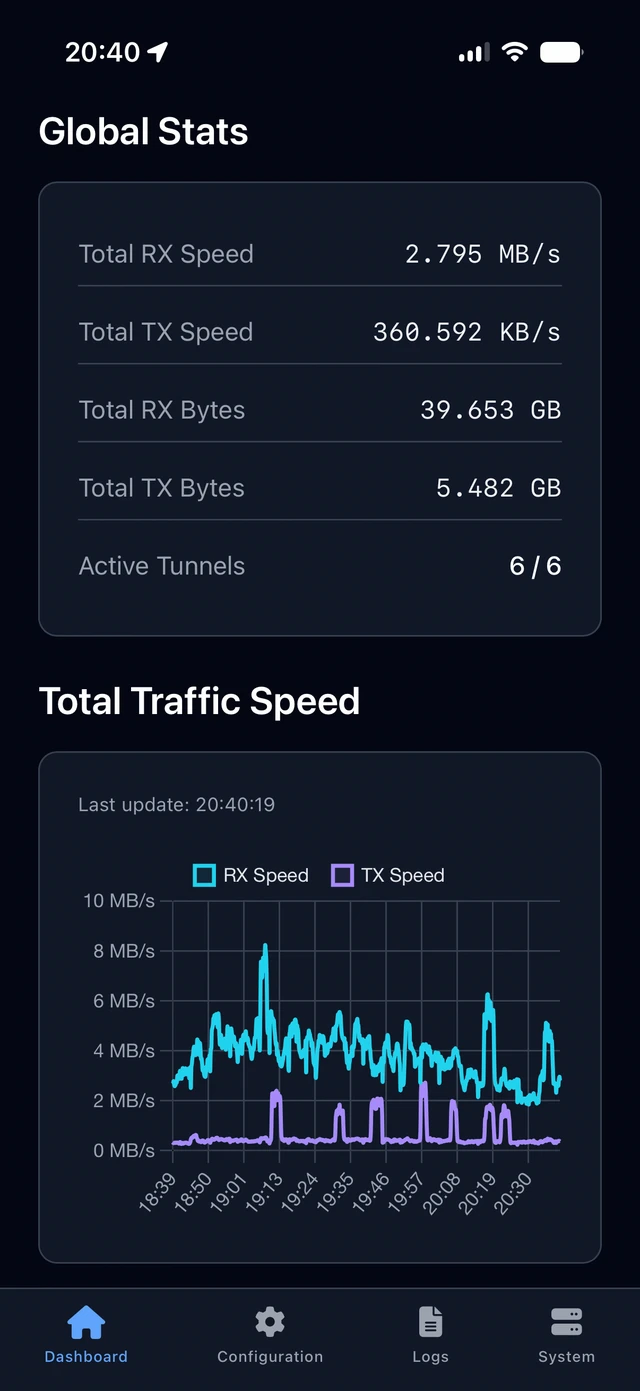
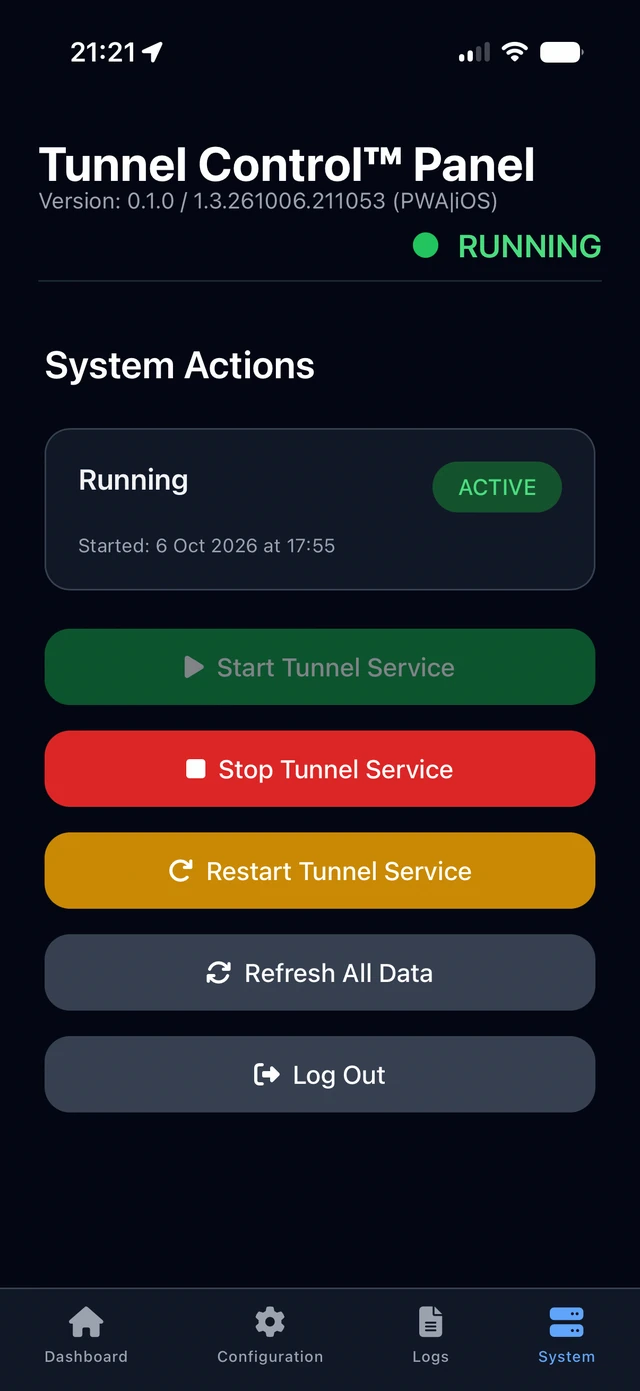
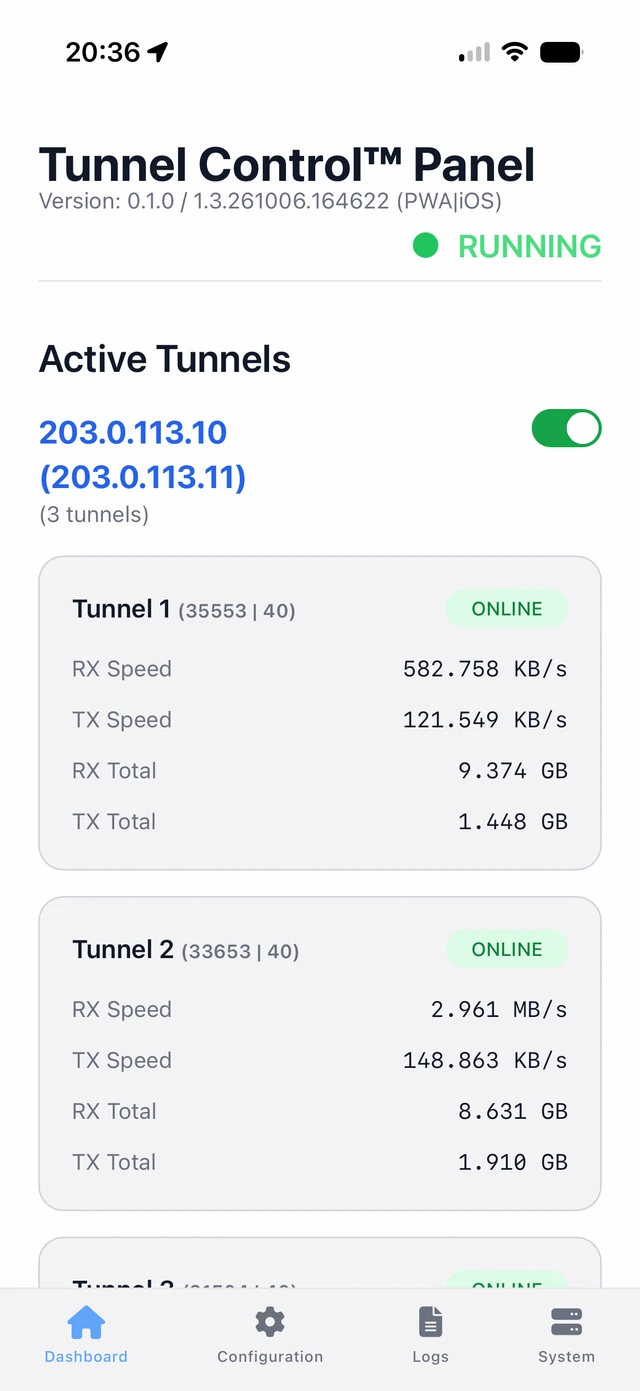
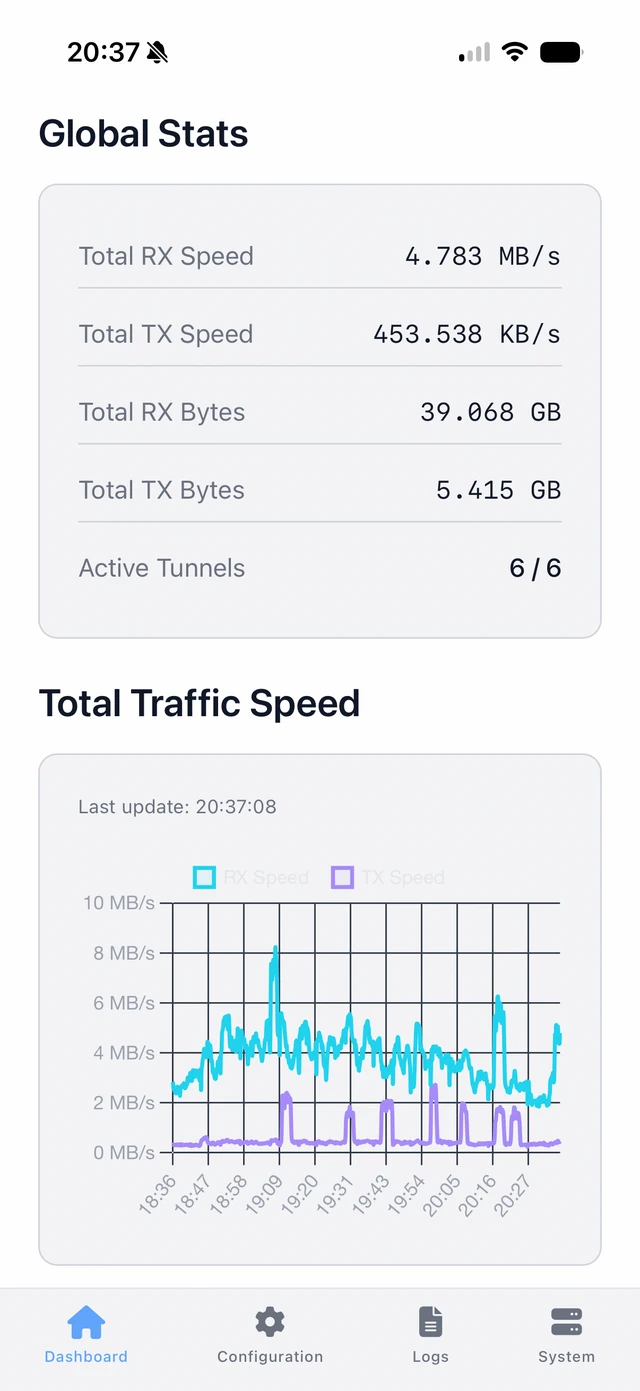
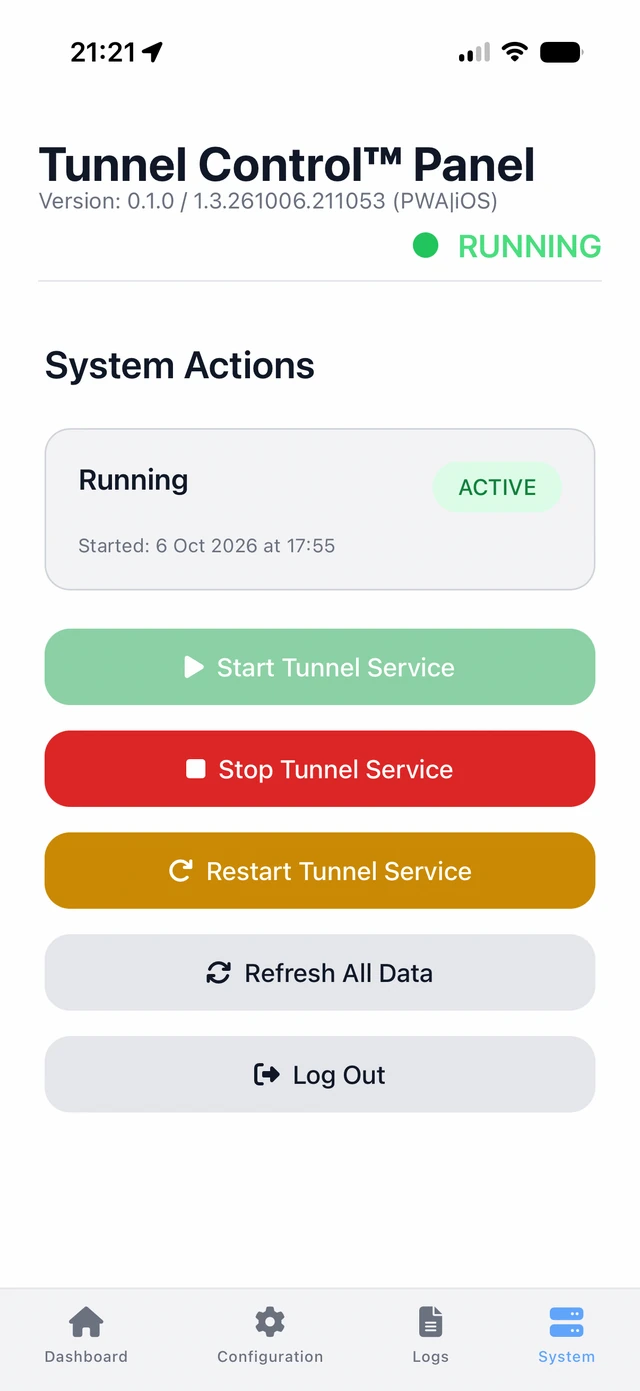
Add the panel to the phone's home screen and tap Enable Push Notifications on the System tab. Notifications then arrive even when the panel is closed; desktop browsers support them as well. You are notified when:
tun service stops or fails;The first notification confirms the subscription. Apple devices require a real contact e-mail in WEB_PUSH_EMAIL; tun --install asks for it.

Host 203.0.113.10 has recovered (3 tunnels OK)
Host 203.0.113.10 is now DEAD (3 tunnels failed)
⚠️ Tunnel service is stopped or failed.
Please check the system.
A server without the web panel and Node.js shows the same state in the terminal: tun --status once, tun --monitor redrawn every few seconds, keys 1–9 turn a host on or off.
Tunnel Control™ Panel 0.2.2
Tunnels: running as the tun service (PID 1342); tun service: active, enabled at boot; client route: group
Web panel: https://192.168.1.10:8443 (active)

Global Stats
Total RX Speed   6.2 MB/s       Total TX Speed   923.5 KB/s     Active Tunnels  6 / 6
Total RX Bytes   26.8 GB        Total TX Bytes   3.1 GB

Active Tunnels

203.0.113.10, 3 tunnels: enabled
TUNNEL     STATE    SINCE           PORT   WEIGHT  RX SPEED    TX SPEED    RX TOTAL   TX TOTAL
Tunnel 1   ONLINE   09:12:05        41873  40      1.4 MB/s    208.3 KB/s  6.1 GB     702.4 MB
Tunnel 2   ONLINE   09:27:41        30512  40      1.3 MB/s    196.0 KB/s  5.8 GB     688.1 MB
Tunnel 3   ONLINE   09:43:18        57209  40      1.5 MB/s    214.9 KB/s  6.3 GB     731.0 MB

198.51.100.7 (198.51.100.8), 3 tunnels: enabled
TUNNEL     STATE    SINCE           PORT   WEIGHT  RX SPEED    TX SPEED    RX TOTAL   TX TOTAL
Tunnel 4   ONLINE   08:55:30        25981  20      0.7 MB/s    101.2 KB/s  2.9 GB     341.5 MB
Tunnel 5   ONLINE   09:58:02        48066  20      0.6 MB/s    98.7 KB/s   2.7 GB     330.8 MB
Tunnel 6   ONLINE   10:13:47        33147  20      0.7 MB/s    104.4 KB/s  3.0 GB     352.6 MB

System Information
CPU: 4.5%   RAM: 492M/913M (53%)   Disk: 11G/19G (60%)   CPU: +58.6°C   GPU: +52.0°C   SSD: +41.9°C
Install
$ curl -fsSL https://tunnelcontrol.app/install.sh | bash
Another folder: … | TUNNELCONTROL_DIR=/srv/tunnelcontrol bash. Installing as a copy of the repository is in the docs. Console only, without the web panel and Node.js: WEB_PANEL=0 in tun.config before tun --install.
CONFIG and TUNNELS in /opt/tunnelcontrol/tun.config.tun --install: dependencies, systemd units, the panel, the first VPS setup and the tunnels. It asks for an e-mail for push notifications until one is set, and for the VPS root password whenever a VPS needs its first setup. Running it again is safe.tun --web-password, then open https://<server address>:8443.Debian or Ubuntu with systemd, root. tun --install installs what is missing (iproute2, iptables, conntrack, openssh-client, sshpass, gawk, and Node.js 20+ for the web panel) and checks in a scratch network namespace that the kernel supports tun devices, policy routing, ECMP, conntrack, tc tbf and ifb.
Debian or Ubuntu with systemd, root over SSH, /dev/net/tun available. On OpenVZ or LXC hosting enable TUN/TAP in the hosting panel first. Missing packages are installed with apt during the setup.
tun --install | install and initialize: dependencies, services, first VPS setup |
tun --start / --restart / --stop / --kill | start, restart, graceful stop, immediate stop |
tun --update | update to the latest release (a copy of the repository: to its latest code), then tun --install |
tun --web-password | set the panel login and password |
tun --status | state of the tunnels, the service and the panel, Global Stats, Active Tunnels, System Information |
tun --monitor [N] | the same, redrawn every N seconds; keys 1–9 turn a host on or off, q quits |
tun --toggle <IP> | turn a host on or off, like its switch in the panel |
tun --version, tun --help | version, list of commands |
What's new
0.2.2
Released , after 0.2.1 the same day and 0.2.0 on
Installed servers update with tun --update; settings and data stay.
tun --web-cert) and a site certificate the panel renews by itself, without a restart. The config editor checks the text as you type and highlights the rejected lines. An app name per server, and push alerts kept for 12 hours. The browser tab and the certificate file carry the name and the address of the server, so several servers do not mix on one device. 0.2.1tun --status, and one push notification. 0.2.2 tun.config.check checks every value. tun --install asks its questions first and stops the tunnels only after the install; tun --update installs the latest release without questions and removes the files that left it.